

In network security, prevention is much more valuable than mending. While you might be able to fix the damage that an attack caused, it’ll cost you more than to have simply prevented it.
Here’s our list of the top Intrusion Prevention systems:
- ThreatLocker Detect – EDITOR’S CHOICE This is a policy-based tool that monitors your network for unusual events and sends alerts. It can also take automated actions as a first line of defense. Start a 30-day free trial.
- ManageEngine Log360 – FREE TRIAL This on-premises package includes a SIEM for threat detection focusing on intrusion. Runs on Windows Server. Start a 30-day free trial.
- CrowdStrike Falcon XDR A SaaS package that collects activity data from endpoints via its own agent and also interacts with third-party security tools for both detection and response.
- SolarWinds Security Event Manager A powerful intrusion prevention tool combining network and host-based methods, with presets.
- Security Onion A Linux distro that doubles as a security solution, it sports tons of security tools, and is an excellent distro-based IPS solution.
- SNORT One of the oldest IPS, it is an excellent program, to the point of being the main software IPS on some hardware-based solutions.
- Zeek Network-based IPS made mostly with science and open-source communities in mind, it features over 110 community-made presets.
- WinPatrol The only Windows host-based IPS solution, it’s one of the few options for monitoring a Windows-based host.
- Osquery A Facebook-made IPS which takes an innovative, SQL based approach to intrusion prevention.
With information ranging from our birthdays to state and business secrets sitting in computer networks, and companies hinging on its constant uptime, it’s important to recognize how crucial cybersecurity is.
Investing in cybersecurity is quite similar to investing in a lock. Sure, if all you’ve got is a TV and a couple of rings, a normal lock will fit you just fine. On the other hand, if you’re keeping 50 gold bars worth of stuff in there, a normal lock is just asking for trouble.
This article will give you an in-depth overview of some of the most prominent tools in a crucial aspect of network security- intrusion prevention.
First we’ll define an IPS(Intrusion prevention system) and compare it to similar technologies like IDS. Finally, we’ll look over 6 different IPS products that can help you begin your next IPS/IDS deployment. If you’re already familiar with the basics of IPSs, then feel free to go immediately to the product comparison.
What is an IPS?
An IPS, or Intrusion Prevention System, is a security system that monitors a network looking for suspicious activity and makes decisions in order to mitigate the damage it caused, or prevent it from ever occurring.
Sometimes you’ll find that an IPS solution is a dedicated piece of hardware running IPS software. For example, Cisco’s Firepower NGIPS (Next-Generation IPS) product line is filled with hardware-based IPS solutions.
Now, these are more akin to the lock on Fort Knox than a regular lock. Most businesses will find that they need something in between. For a home network, simply running a piece of software on your computer will be enough.
IPS & Firewall- What’s The Difference?
A lot of people consider firewalls to be superior to an IPS. It’s important to note that not only do firewalls and IPS work in different ways, they are also made to resolve different issues.
Firewalls are used to implement rules that’ll stop traffic from occurring based on a set of guidelines. A firewall will help you stop insecure protocols and ensure who has access to what. For example, if you’re facing an issue with the Telnet default port, you’ll use a firewall.
On the other hand, most attacks occur around firewalls, and won’t violate their guidelines.
For example, let’s say a hacker is performing a brute force SSH(Secure Shell) attack. If our servers are configured to accept SSH connections, the firewall won’t do anything. On the other hand, an IPS could analyze the headers and payloads of the hacker’s packets, and halt them. In essence an IPS is used to find, stop, and prevent suspicious behavior that gets around our firewall.
Host-Based IPS or Network-Based IPS?
An IPS can be deployed at one of two levels:
- Host: A host-based IPS will protect the host that it was installed on, usually a single device. A host-based IPS provides a more in-depth and detailed protection of a single device and its local files. Furthermore, it’ll help you detect attacks originating from the device, such as programs inserted through a flash drive.
- Network: A network-based IPS will protect an entire network. It’ll provide you better visibility than a host-based IPS in addition to being able to protect specific endpoints containing vital data before they’re even attacked.
IPS Or IDS?
An IDS is an Intrusion Detection System. These two cybersecurity measures are often confused for one another. This happens because most products will feature both, and an IPS is essentially just a proactive IDS. The main difference between the two is that an IPS will proactively attempt to stop threats, while the IDS will just detect their existence.
If a threat appeared, both the IPS and IDS would scour the network for suspicious packets. The differences start showing once they find it. The IDS would simply take note that the packet appeared, or send a notification to you. The IPS would do both of those, in addition to dropping the suspicious packets.
The advantage of an IPS is that it’s great for preventing attacks, while an IDS won’t have a chance of affecting your processes due to a false positive.
The Two Methods Of Threat Detection
An IPS will use one of two methods to detect threats:
- Signature-based Detection: This is a method of detection which compares traffic to a pre-existing database of threats. It’ll only take action if an instance of traffic has the same “signature” as one of the threats in the database.
- Anomaly-based Detection: This method of threat detection works by creating a baseline for your network’s activity. Then it’ll compare all traffic to that baseline. If there’s any significant deviation, it’ll go into action. This is the better of the two for preventing a zero-day attack since the signature-based detection system might not have a suitable signature. With that being said, these are much harder and costlier to develop.
Why you need SIEM software
SIEM or Security information and event management products will help you understand your network security data. SIEM software can help you scale your IPS and IDS solutions up and down easier. They also enhance their capability to defend your network, helping you improve reporting, find correlations, and a myriad of other benefits.
In essence, SIEM tools will allow you to create a much more complete security coverage out of your IDS and IPS data.
So, without further ado, let’s get into the top 6 IPS & IDS tools!
The best intrusion prevention systems
1. ThreatLocker Detect – FREE TRIAL

ThreatLocker Detect continuously monitors your network for any anomalies, events, or Indicators of Compromise (IoC), and sends alerts right away. It uses the data collected by other ThreatLocker modules and from Windows system logs to provide insights into your organization’s security posture, so you can take action accordingly.
Main Features:
- Identifies malicious activities before they can impact your organization.
- Takes automated actions when a threat is detected.
- Detects anomalies and multiple login failures.
- Enables administrators to make custom policies for decision-making.
- Recommends actions based on frameworks like MITRE and CISA.
- Identifies unexpected behavior in Microsoft 365 environments.
- Compiles all incidents, alerts, and other relevant data into intuitive dashboards.
Operating Systems:
Windows, macOS, and Linux.
Why do we recommend it?
We highly recommend ThreatLocker Detect because it uses a structured approach to detect issues and anomalies in your network. In particular, what we love about this tool is that it can be configured to take automated actions like locking down a device, disconnecting it from a network, shutting it down, and more, so the infection does not spread to the rest of the network. Also, its intuitive dashboards and comprehensive alerts provide the necessary context for administrators to take action immediately.
Who is it recommended for?
ThreatLocker Detect is a good choice for medium to large enterprises that want to stay on top of anomalies and imminent cyberattacks. Its proactive approach can also help organizations in regulated industries, those handling sensitive data, and enterprises that want to safeguard assets from ransomware and other cyberattacks.
Start a 30-day fee trial.
EDITOR'S CHOICE
ThreatLocker Detect wins the Editor’s Choice award for the best Intrusion Prevention System because it takes a proactive approach to cybersecurity. It continuously analyzes the data collected from other modules and Windows system logs to identify any anomalies and events that can be a potential threat to your network. Besides sending alerts of these events, it can also be configured to take automated actions that can further safeguard your resources. And lastly, we love its dashboards, as they are intuitive and provides all the information in easy-to-digest formats.
Download: Start a 30-day FREE Trial
Official Site: https://www.threatlocker.com/try-threatlocker
OS: Windows, macOS, Linux, Cloud/SaaS and Hybrid
2. ManageEngine Log360 – FREE TRIAL
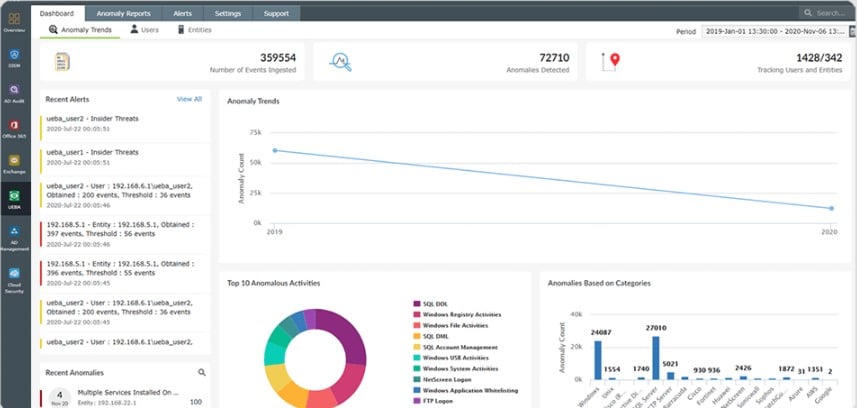
ManageEngine Log360 performs data protection and security standards compliance through several strands, which include a SIEM for intrusion detection. The SIEM mines log information and so the Log360 package also includes a log manager that collects, consolidates, and files log messages from operating systems and more than 700 applications.
Main Features:
- Log collection and searching for intrusion events
- Protection for sensitive data
- Log file management
- USB device control
- Email scanning
- Insider threat detection and file integrity monitoring
- Compliance reporting for HIPAA, PCI DSS, FISMA, SOX, GDPR, and GLBA
Operating system support:
- Windows Server
Why do we recommend it?
We recommend ManageEngine Log360 because it offers a comprehensive suite of security features, including log collection, intrusion event monitoring, insider threat detection, and compliance reporting. This makes it a versatile solution suitable for organizations looking to bolster their cybersecurity defenses and adhere to various compliance requirements. With a user-friendly interface and a 30-day free trial, it’s accessible and effective for businesses of different sizes.
Who is it recommended for?
ManageEngine Log360 is recommended for a wide range of organizations seeking robust security and compliance solutions. It’s suitable for businesses of all sizes and industries, from small enterprises to large corporations. Specifically, it’s valuable for IT administrators, security professionals, and compliance officers looking to streamline log management, strengthen intrusion detection, protect against insider threats, and ensure compliance with industry regulations like HIPAA, PCI DSS, FISMA, SOX, GDPR, and GLBA
. There is a free version, but it is better to get the 30-day free trial of the Premium edition.
3. CrowdStrike Falcon XDR
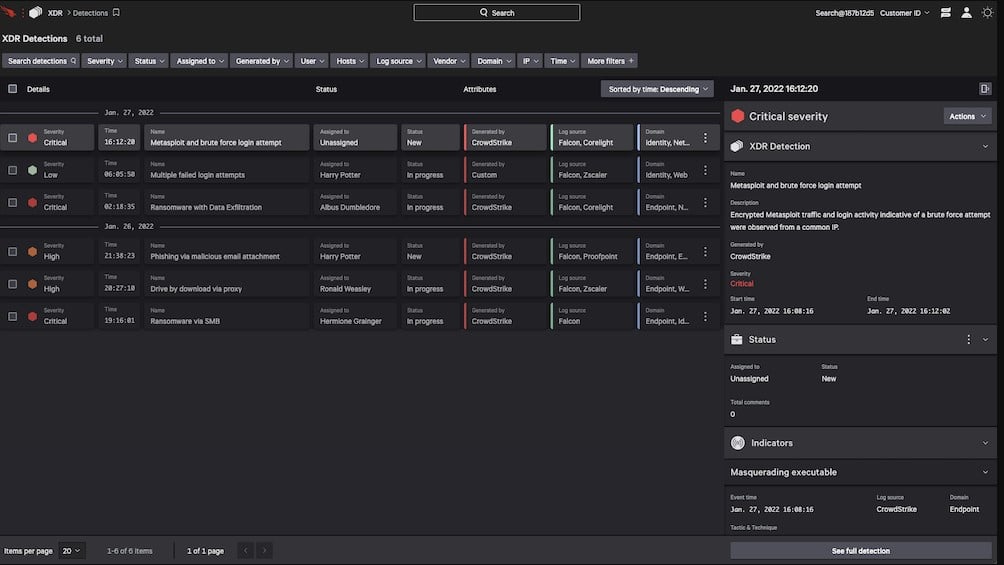
CrowdStrike Falcon XDR is an anomaly-based detection system that can be enhanced by indicators of compromise (IoC) from a threat intelligence feed. The system interacts with another product in the Falcon product family, called Falcon Prevent to gather activity data from endpoints. The service also interacts with third-party security tools through a mechanism called security orchestration, automation, and response to extract activity data and to send back response instructions.
Main Features:
- Gathers endpoint activity data from Falcon Prevent and third-party security tools
- Deploys user and entity analytic behavior (UEBA) to establish a baseline of normal activity
- Searches for anomalous behavior
- Interacts with other tools to shut down malicious activities
- Can be enhanced by a threat intelligence feed
Operating system support:
CrowdStrike Falcon XDR is a cloud-based system. It works in conjunction with Falcon Prevent, which is available for Windows, macOS, and Linux.
Why do we recommend it?
CrowdStrike Falcon XDR is recommended for its advanced anomaly-based detection capabilities and integration with threat intelligence feeds, enhancing its ability to detect and respond to sophisticated threats effectively. It not only collects activity data from endpoints but also interacts with third-party security tools for comprehensive threat detection and response.
Who is it recommended for?
CrowdStrike Falcon XDR is recommended for enterprises and cybersecurity-focused businesses seeking advanced threat detection and response. It’s an ideal choice for IT security teams looking to integrate endpoint activity data and work seamlessly with third-party security tools. Falcon XDR also suits those leveraging threat intelligence feeds for comprehensive protection against a wide range of threats, making it a versatile solution for staying ahead of cybersecurity challenges.
You can get Falcon Prevent on a 15-day free trial.
4. SolarWinds Security Event Manager
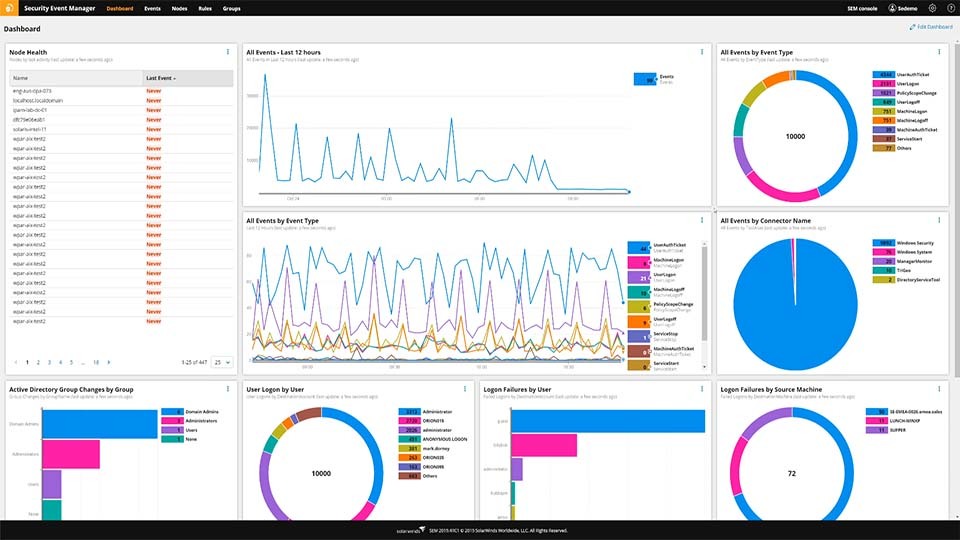
SolarWinds Security Event Manager (SEM) is not exclusively an IPS tool. It is a swiss knife of network security, containing data loss prevention tools, IDS, IPS, etc. It is a virtual program running on a pre-hardened installation of Linux. It can be deployed on a variety of hypervisors including Vmware, vSphere, and Microsoft HyperV.
Main Features:
- Centralized and normalized log collection
- IPS-style automatic threat detection and deletion
- In-built compliance reporting tools
- Slick and intuitive UI
- Informative dashboard giving you a quick scope of all your data
- In-built FIM (file integrity monitoring.)
- Easy licensing
Operating System Support:
- Linux
- macOS
- Mojave
- Sierra
- High Sierra
- Oracle®
- Solaris 10 and later
- Windows (10, 8, 7, Vista)
Why do we recommend it?
SolarWinds Security Event Manager is a top recommendation for organizations seeking robust security and event management solutions. Its comprehensive feature set, including intrusion prevention, centralized log collection, and compliance reporting, offers a versatile and user-friendly approach to security. With access to threat intelligence feeds and a free 30-day trial, it’s an excellent choice for organizations looking to proactively protect their digital assets.
Furthermore, this IPS solution provides a Snort log analyzer, as well as access to threat intelligence feeds which will greatly help you scale your cybersecurity solutions.
The SolarWinds SEM is supported by Windows servers, and it will compile according to a variety of different standards including HIPAA, SOX, and PCI DSS.
Who is it recommended for?
SolarWinds Security Event Manager is recommended for a broad range of organizations, from small businesses to large enterprises, seeking a powerful and versatile security and event management solution. Its flexibility, centralized log collection, intrusion prevention, and compliance reporting make it suitable for those prioritizing comprehensive cybersecurity measures and regulatory compliance across various industries.
In case you’re on the fence about trying it out, there’s a free 30-day trial!
5. SECURITY ONION
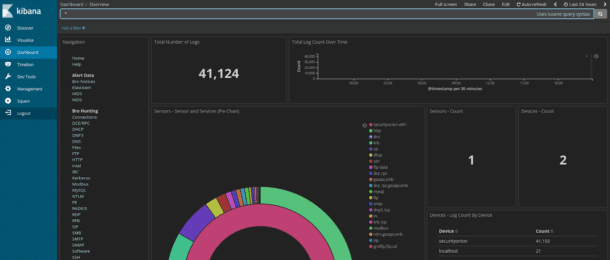
Security Onion itself is an operating system, being a Linux distro that doubles as a quality security solution. Once again, it is not simply just an IDS/IPS, it features a variety of other security features. It uses OSSEC for its host-based IPS and Suricata and SNORT to handle network-based IPS.
Main Features:
- Extremely scalable
- Open-source software with a helpful community
- In-built tools like Elasticsearch, Logstash, Bro, NetworkMiner, and others.
- Covers a variety of data-types for complete protection
- Intuitive interface that’s extremely polished for a free tool.
Operating System Support:
As a Linux distro in and of itself, Security Onion only supports itself.
Why do we recommend it?
Security Onion is recommended for its multifaceted approach to network security, making it an excellent choice for those who need more than just intrusion prevention. It offers a Linux-based security solution with a variety of security tools and intuitive features for comprehensive protection. Security Onion is highly scalable, open-source, and backed by a supportive community, making it an ideal option for users seeking a versatile and cost-effective intrusion prevention system.
Who is it recommended for?
Security Onion is recommended for IT professionals and organizations looking for a comprehensive network security solution. It’s particularly suitable for those who prefer open-source software, as it offers a wide range of security tools and a supportive community. Security Onion’s scalability and versatility make it a valuable choice for small to large enterprises seeking effective intrusion prevention and overall network security.
You can get it for free here!
6. SNORT
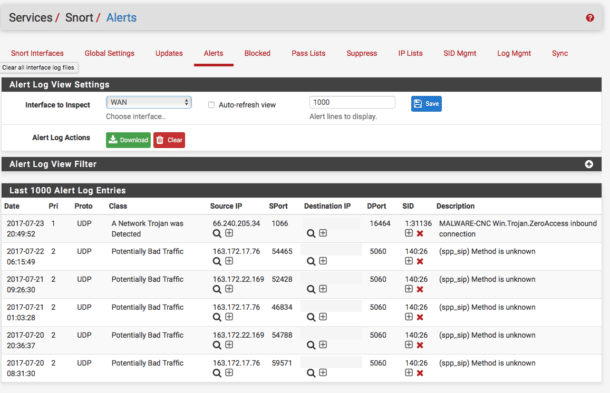
Created in 1998, SNORT is one of the oldest cybersecurity solutions on this list. It is one of the most popular open-source IPS’ with a huge community around it. This means that if you’re having trouble with it, you’ll be able to easily find tons of others that have had and solved similar issues.
Main Features:
- Open-source solution
- One of the best free scalable solutions
- Huge community to help you with any issues
- It has quite a few versatile uses.
Operating System Support:
- Windows
- FreeBSD
- Centos
- Fedora
Why do we recommend it?
SNORT is recommended for its strong features, particularly its open-source nature and extensive community support. Its versatility, the ability to run both as an intrusion detection system (IDS) and intrusion prevention system (IPS), and the availability of numerous customizable policies make it a valuable choice for network security.
SNORT will provide you with the choice of whether to run it as an IDS or IPS. By running it in Network Intrusion Detection System Mode you’ll be given the choice of whether you want it to simply detect or detect and block threats.
Its Sniffer Mode is designed to work as a packet sniffer, and together with its Packet Logger Mode you’ve got an excellent network traffic logging tool.
SNORT uses a mostly signature-based approach to IPS/IDS. While it comes with an array of in-built policies, you can also add your own. If you aren’t feeling quite brave enough to do this on your own, the large community has a variety of suggestions.
While SNORT isn’t ideal for enterprise-sized organizations, it is capable of securing them. This is more than can be said for almost any free tool out there, earning it a spot on this list. Even some enterprise-grade hardware IPS solutions such as the Cisco 4000 Series Integrated Services Routers use this software for their IPS/IDS.
The IDS/IPS functionalities of SNORT are mostly signature-based. SNORT comes with a set of base policies, but you can also write your own. While this may seem intimidating at first, the large community makes things a lot easier and helps contribute to a robust set of knowledge and rulesets available for SNORT.
As a bonus, if you are looking to get started working with a free IPS software that will have value even in enterprise applications, consider getting familiar with SNORT. Enterprise devices like Cisco’s 4000 Series Integrated Services Routers use SNORT for IPS and IDS.
Who is it recommended for?
While it may not be ideal for large enterprises, SNORT is capable of securing small to medium-sized networks effectively. Its extensive community and rule set support enhance its capabilities, making it a compelling option for cost-conscious users.
7. Zeek Network Security Monitor
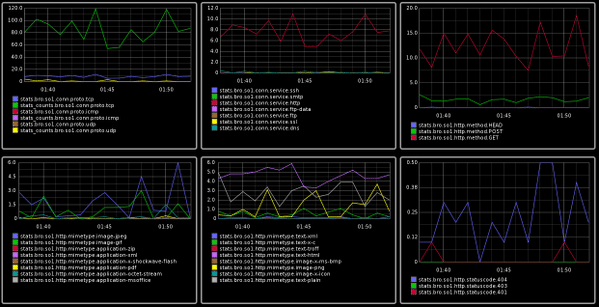
The Zeek(formerly Bro) security monitor provides you with an expansive network analysis framework which also contains network-based IDS/IPS. Due to being developed by scientists, Zeek is mainly used in scientific, open-source, and supercomputing areas. It has been sponsored by names such as the National Science Foundation and Mozilla.
Main Features:
- 20 Years of federal funding
- Over 100 community-contributed packages
- Scalable to 100G networks
- Flexible application
Operating System Support:
- Linux
- Free BSD
- macOS
Why do we recommend it?
With support from organizations like the National Science Foundation and Mozilla, Zeek is a trusted choice. Additionally, its versatile approach, including signature-based detection, behavioral analysis, passive monitoring, and anomaly-based detection, makes it a comprehensive solution for scientific, open-source, and supercomputing environments.
Zeek subscribes to a mostly signature-based method of detection, however, that is nowhere near the end of its capabilities. It features behavioral analysis as well as passive monitoring, anomaly-based detection and a variety of other features.
Who is it recommended for?
Zeek is recommended for organizations and individuals operating in scientific, open-source, and supercomputing areas.
Organizations and individuals can deploy Zeek to monitor network traffic, detect suspicious or malicious activities, and generate detailed logs and reports for security analysis. This helps in identifying potential threats, tracking network behavior, and maintaining the security of network infrastructures.
8. WinPatrol
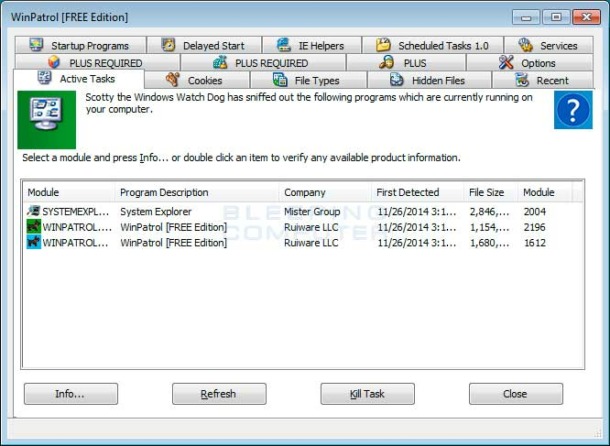
WinPatrol is the only Windows host-based IPS solution. If you came to this list searching for an IPS/IDS to find a solution that can protect a Windows host from suspicious activity, then this is one of the better entries for you.
Main Features:
- One of the only Windows host-based IPS
- It can monitor changes to hidden files
- It pioneered using a heuristic behavioral approach to find threats
Operating System Support:
- Windows-only
Why do we recommend it?
WinPatrol is recommended for its unique focus on Windows host-based intrusion prevention and its heuristic behavioral approach to detecting threats. It offers features like monitoring changes to hidden files, file type association changes, and registry changes, making it an effective tool for protecting Windows hosts from suspicious activities.
WinPatrol can also do a variety of other things such as monitor file type association changes, registry changes, etc. With that being said, WinPatrol is known for having many false positives, as well as experiencing the occasional odd crash.
Who is it recommended for?
WinPatrol is recommended for individuals or organizations seeking host-based intrusion prevention on Windows operating systems.
It’s suitable for those who want to monitor and protect their Windows hosts from suspicious activities, changes to hidden files, file type association alterations, and registry modifications.
Pricing: There is a free version and a premium version. The premium version is priced at $19.95 per year and contains additional features.
9. Osquery
Osquery is an IPS/IDS made by Facebook. Its main defining feature is its unique approach to detecting malicious activity. The program uses extremely basic SQL commands in order to take a snapshot of your data.
Main Features:
- It supports every popular operating system out there.
- Its unique approach helps it find issues other IPS can’t
- It sports a lightweight and fast infrastructure
- It’s open-source, so you can modify it as you see fit.
Operating System Support:
- Windows
- macOS
- FreeBSD
- Centos
- Ubuntu
- And a variety of other Linux distros
Why do we recommend it?
Osquery, developed by Facebook, employs basic SQL commands to take snapshots of your data, making it highly customizable to suit your network’s specific needs. This flexibility allows you to detect and prevent malicious activities that might be missed by other intrusion prevention systems. Additionally, Osquery supports a wide range of operating systems and is open-source, offering a lightweight and fast infrastructure for enhanced security.
Now, this might seem like an unnecessary and trivial function, however, even their homepage lists an example of how you could use that to find a process running without its original binary on the same HDD. Naturally, this function can be customized as you see fit to fit right into your network.
The fact it’s supported by Facebook, means that it’s likely Osquery will improve by leaps and bounds from where it is today.
Who is it recommended for?
Osquery is recommended for its versatility, suitable for IT security professionals, small to medium-sized businesses, and organizations with diverse operating systems.
Its innovative use of SQL commands for intrusion prevention sets it apart, making it a choice for those seeking cutting-edge solutions. Additionally, being open-source, Osquery caters to open-source enthusiasts and organizations with limited resources aiming to bolster their network security.
If you need an extremely lightweight, free, and unique IPS, this is the one for you.
Choosing an IPS
No network security setup is complete without an IPS/IDS.
Although IPS and IDS are extremely important to network security, you can’t expect them to handle all possible threats. To return to the lock analogy, it doesn’t matter how strong your lock is if the burglars come through the window. There are methods of intrusion which don’t involve stealing passwords or breaking encryption.
One of the most common methods of gaining entry is social manipulation of employees. You need to educate members of your staff about how to control what information goes to whom. Education of staff is half of prevention in itself. It’s also important to use interactive ID methods for employees, as staff may be tricked by a fake email or phone call from a hacker pretending to be their manager.
There’s also a variety of other measures that one can take in order to protect their company’s digital presence. For example, you could include document access controls which won’t let certain pieces of data be printed, emailed, or changed in any way.
It also isn’t a bad idea to shield your WiFi to stop anyone from gaining entry into your network through your WiFi connection. The main takeaway is that all of us need to be getting more and more creative with our prevention methods.
This is because attackers are becoming more and more sophisticated, and striking at angles we didn’t know existed before.
Did we miss your favorite intrusion prevention system? Was there a factor we overlooked? Write to us in the comments!